

Small businesses often struggle to stand out online because their content isn't optimized for search engines. Without proper keyword targeting, clear structure, and ongoing performance tracking, even great products or services can remain invisible to potential customers. Mastering a straightforward content optimization process can dramatically improve your search rankings, drive more organic traffic, and help you compete effectively without breaking the bank. This guide walks you through every step, from initial preparation through execution and verification, giving you practical tools to enhance your online presence and attract the right audience.
Table of Contents
- Key Takeaways
- Preparing for your content optimization process
- Executing the content optimization process step-by-step
- Verifying and maintaining your optimized content's performance
- Affordable SEO services tailored for small businesses
- Frequently asked questions
Key Takeaways
| Point | Details |
|---|---|
| Content audit and keyword research | Perform a site content audit to identify underperforming content and conduct keyword research to target relevant long tail phrases. |
| Measurable optimization goals | Set specific targets such as increases in organic traffic or ranking positions to guide actions and measure success. |
| Prioritize high traffic pages | Focus initial efforts on pages with existing traffic to leverage current authority and achieve faster results. |
| On page optimization and verification | Implement on page updates such as meta tags, headers, and keyword placement, and monitor results with Google Analytics and Search Console. |
Preparing for your content optimization process
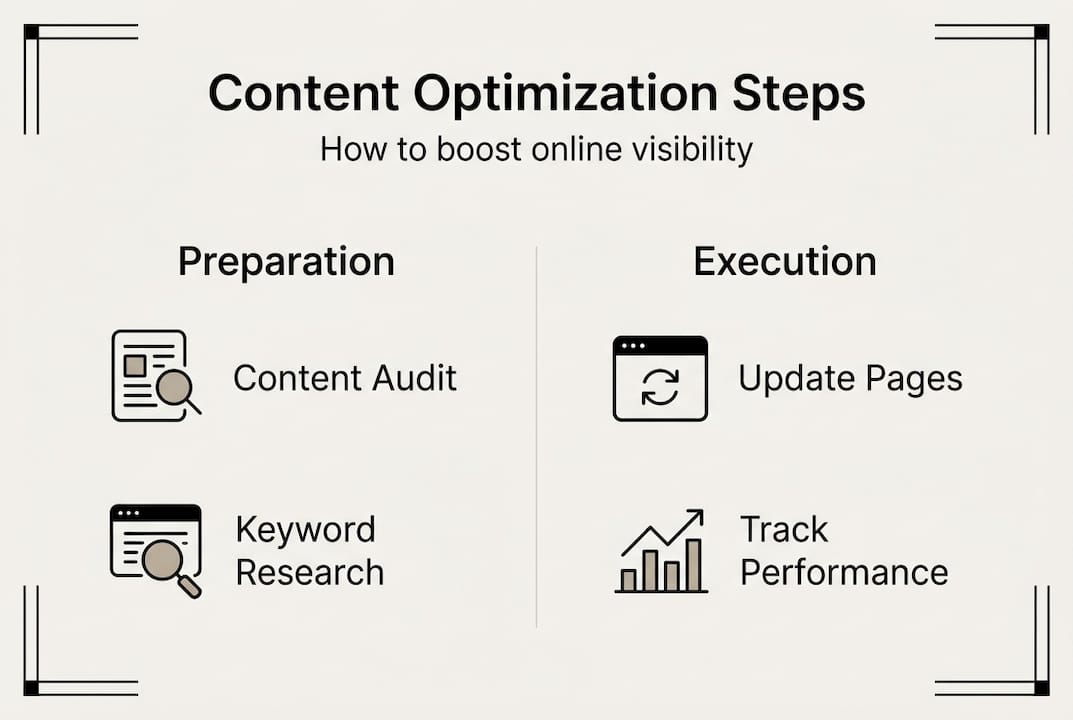
Before you start changing anything on your website, you need a clear picture of where you stand and where you're headed. Small businesses benefit from performing a thorough content audit and keyword research before optimization. This foundation work prevents you from optimizing the wrong pages or targeting keywords that won't bring customers.
Start by auditing your existing content. Look at every page on your website and note which ones already get traffic, which ones have high bounce rates, and which topics resonate with your audience. Use Google Analytics to identify your top performers and your underachievers. This audit reveals your strengths and weaknesses, showing you exactly where to focus your optimization efforts.
Next, conduct keyword research targeting your specific audience. Think about the exact phrases your potential customers type into Google when they need your services. Use free tools like Google Keyword Planner, Ubersuggest, or AnswerThePublic to find relevant keywords with decent search volume but lower competition. Focus on long-tail keywords (three to five words) because they're easier to rank for and often indicate stronger purchase intent.
Gather the tools you'll need for the optimization process. At minimum, you need access to your website's content management system, Google Analytics, and Google Search Console. Many small businesses also benefit from affordable SEO services for small businesses that provide additional keyword tracking and competitor analysis tools. Even free versions of SEO tools can give you valuable insights without requiring a big budget.
Set clear, measurable objectives before you start. Define what success looks like for your business. Are you aiming for a 20% increase in organic traffic over three months? Do you want to rank on page one for three specific keywords? Maybe you want to reduce your bounce rate by 15%. Specific goals let you track progress and adjust your strategy based on real data rather than guesswork.
Pro Tip: Prioritize pages that already get some traffic. These pages have existing authority with search engines, so optimization improvements often show results faster than starting from scratch with brand new content. Focus your initial efforts on your top 10 to 15 pages by traffic volume.
Create a simple spreadsheet to track your optimization work. Include columns for page URL, target keyword, current ranking, current traffic, optimization date, and notes. This tracking system keeps you organized and makes it easy to measure improvements over time. You'll reference this document repeatedly as you execute your optimization strategy and verify results.
Now that you're equipped with the right tools and insights, let's explore how to execute the content optimization step-by-step.
Executing the content optimization process step-by-step
With your preparation complete, you're ready to make actual changes that improve your search visibility. On-page SEO improvements like meta tags, headers, and keyword integration significantly enhance search performance. Follow these steps systematically for each page you're optimizing.
-
Update your title tags and meta descriptions. Your title tag is the clickable headline in search results, and your meta description is the preview text below it. Include your target keyword naturally in both, but write them primarily for humans, not search engines. Your title should be compelling and accurately represent the page content in 50 to 60 characters. Your meta description should entice clicks while summarizing the value you offer in 150 to 160 characters.
-
Organize content with proper header tags. Use H1 for your main page title (only one per page), H2 for major section headings, and H3 for subsections. This hierarchy helps search engines understand your content structure and makes it easier for readers to scan. Include related keywords naturally in some headers, but prioritize clarity over keyword stuffing. Good header structure improves both SEO and user experience.
-
Ensure your content answers key audience questions. Review the search intent behind your target keywords. What specific problem is someone trying to solve when they search for that term? Rewrite or expand sections to directly address those needs. Include practical examples, actionable steps, or specific data that makes your content more valuable than competing pages. Relevance to user intent is one of the strongest ranking factors.
-
Add strategic internal and external links. Link to other relevant pages on your website to keep visitors engaged and help search engines understand your site structure. Also include links to authoritative external sources when you reference statistics, research, or expert opinions. These outbound links build credibility and show search engines that your content is well-researched. Aim for three to five internal links and two to three external links per page, depending on content length.
-
Improve readability and visual appeal. Break up long paragraphs into chunks of three to four sentences maximum. Use bullet points or numbered lists to present information clearly. Add relevant images, charts, or infographics if they enhance understanding. Check that your font size is readable on mobile devices and that there's enough white space to prevent overwhelming readers. Better readability keeps visitors on your page longer, which signals quality to search engines.
-
Optimize for mobile and page speed. Over 60% of searches happen on mobile devices, so your content must look good and load fast on smartphones. Use Google's Mobile-Friendly Test and PageSpeed Insights to identify issues. Compress images, minimize code, and consider using a content delivery network if page speed is slow. Mobile optimization and fast loading times directly impact your rankings.
Pro Tip: Avoid keyword stuffing at all costs. Aim for a keyword density of 1% to 2%, which means your target keyword appears once or twice per 100 words. Focus on natural language and variations of your keyword rather than repeating the exact phrase constantly. Search engines penalize obvious over-optimization, and readers find it annoying.
As you work through each page, document what you changed in your tracking spreadsheet. Note the optimization date and any specific updates you made. This record becomes invaluable when you start measuring results because you'll know exactly what actions led to improvements. Take your time with each page rather than rushing through dozens of superficial updates.

With your optimized content live, the next critical step is to verify and maintain its performance over time.
Verifying and maintaining your optimized content's performance
Optimization isn't a one-time task. Regular analysis and updates based on performance metrics help maintain content relevance and rankings. You need systematic verification to know what's working and what needs adjustment.
Use Google Analytics and Google Search Console as your primary measurement tools. Google Analytics shows you traffic patterns, user behavior, bounce rates, and conversion data. Google Search Console reveals which keywords drive impressions and clicks, your average position in search results, and any technical issues affecting your site. Check both tools weekly during the first month after optimization, then monthly once you establish baseline performance.
Compare key metrics before and after your optimization work. Look at organic traffic, average time on page, bounce rate, and conversion rate for each optimized page. Track your rankings for target keywords using your spreadsheet or a rank tracking tool. Improvements might take four to eight weeks to become obvious, so be patient but vigilant. Document any significant changes and try to correlate them with specific optimization actions.
| Metric | What to track | Healthy benchmark |
|---|---|---|
| Organic traffic | Unique visitors from search engines | 15-30% increase over 3 months |
| Average position | Keyword ranking in search results | Move from page 2+ to page 1 |
| Bounce rate | Percentage who leave after one page | Below 60% for most content |
| Time on page | Average seconds spent reading | Above 2 minutes for informational content |
| Click-through rate | Impressions vs clicks in Search Console | 3-5% or higher from search results |
Set a regular schedule to review and refresh your content. Search trends change, competitors update their content, and information becomes outdated. Review your top-performing pages quarterly to ensure they still provide current, accurate information. Check underperforming pages biannually to determine if they need major updates, consolidation with other pages, or removal. This ongoing maintenance keeps your content competitive.
Address declining metrics promptly by revisiting keyword relevance and content quality. If a previously strong page starts losing traffic, investigate whether search intent has shifted, new competitors have emerged, or your content no longer fully answers user questions. Sometimes a simple refresh with updated statistics, new examples, or improved formatting can restore performance. Other times you might need to target different keywords or completely rewrite sections.
Avoid common pitfalls that undermine optimization efforts. Ignoring mobile optimization is one of the biggest mistakes because mobile-first indexing means Google primarily uses your mobile site for ranking. Slow page speed frustrates users and hurts rankings, so address technical performance issues quickly. Neglecting internal linking wastes the authority you've built, and failing to update outdated content damages credibility. Stay proactive rather than reactive.
Troubleshoot common SEO issues systematically. If rankings drop suddenly, check Google Search Console for manual penalties or technical errors. If traffic plateaus, analyze whether you're targeting the right keywords or if your content needs more depth. If bounce rates are high, improve your introduction to hook readers immediately or ensure your content matches the promise in your title and meta description. Most SEO problems have identifiable causes and practical solutions.
Having learned how to verify your results, you're now well-prepared to maintain strong search visibility with ongoing content optimization.
Affordable SEO services tailored for small businesses
If managing content optimization alongside running your business feels overwhelming, professional support can accelerate your results while freeing up your time. Zoi Digital offers budget-friendly SEO solutions specifically designed for small business needs, covering everything from keyword research and content auditing to on-page optimization and ongoing performance monitoring.
Their structured approach starts with a free consultation and website audit to identify your biggest opportunities, then develops a customized strategy that fits your budget and goals. You get transparent monthly reports showing exactly how your investment translates into better rankings, increased traffic, and more leads. Partnering with experienced professionals means you benefit from proven strategies without needing to become an SEO expert yourself. Explore affordable SEO services for small businesses to find packages that match your specific business goals and budget constraints.
Frequently asked questions
What is the content optimization process?
Content optimization is the practice of improving your website content to rank higher in search engine results and better engage your target audience. It includes keyword research, updating on-page elements like titles and headers, enhancing content quality and relevance, and ongoing performance tracking. The goal is to make your content more discoverable and valuable to both search engines and real users.
How long does it take to see results from content optimization?
Most businesses start seeing measurable improvements in four to eight weeks after implementing optimization changes. However, highly competitive keywords or brand new websites may take three to six months to show significant ranking improvements. Factors like your site's existing authority, the competitiveness of your target keywords, and the quality of your optimization work all influence the timeline.
Can I optimize content without technical SEO knowledge?
Yes, many content optimization tasks require no technical expertise. Updating titles, improving readability, adding relevant keywords naturally, and creating better content are all accessible to non-technical business owners. However, some aspects like site speed optimization, mobile responsiveness, and structured data markup may benefit from professional help or learning basic technical skills.
How often should I update optimized content?
Review your top-performing content quarterly to ensure information remains current and accurate. Check underperforming pages every six months to determine if they need refreshing, consolidation, or removal. Industries with rapidly changing information may need more frequent updates, while evergreen topics can go longer between reviews. Consistent monitoring helps you catch declining performance before it significantly impacts traffic.
What's the difference between content optimization and content creation?
Content creation is writing new pages or articles from scratch, while content optimization improves existing content to perform better in search results. Optimization is often more cost-effective because you're building on content that already has some authority rather than starting from zero. Most successful SEO strategies combine both approaches, creating new content for gaps while continuously optimizing existing pages.
Do I need expensive tools to optimize my content effectively?
No, you can accomplish significant optimization with free tools like Google Analytics, Google Search Console, Google Keyword Planner, and Ubersuggest. These provide keyword data, performance metrics, and technical insights without any cost. Paid tools offer more advanced features and convenience, but they're not essential for small businesses just starting their optimization journey. Focus on consistent execution with free tools before investing in premium options.